 SUNA
PV dashboard for Deye, Growatt, Huawei and more Your solar system. Live on every screen.
SUNA shows you in real time where your solar energy goes: into your home, into the battery or into the grid. On your phone, your computer or a tablet on the wall.
At home on a Raspberry Pi, mini PC or NAS in your network. Or as SUNA Online, without any hardware of your own. Several systems? All in one account and one app.
One glance is enough. Anywhere.
SUNA adapts to every screen. Light by day, dark at night, or automatically following the sun.
Tablet on the wall
In the hallway or kitchen: time, energy flow and today’s figures at a glance. It dims by itself at night.
Phone
Quickly check whether the battery is full and whether now is a good time for the washing machine.
Computer
History and statistics on a big screen, with CSV export.
Everything your system does
Live energy flow
Sun, grid, home and battery in one scene. Rings show self-sufficiency and charge, moving lights show the power.
History and statistics
Day, month and year. Self-sufficiency, savings in euros, base load and inverter loss.
Local and private
SUNA runs on your home network. No manufacturer cloud, no ads, no tracking.
Many inverters
Deye, Growatt, Huawei, Sungrow and Hoymiles locally or via the cloud, plus Anker SOLIX, EcoFlow and devices with a Solarman stick via the cloud. More manufacturers are added all the time.
Glass or Nerd
Modern glass whose sky follows the sun above your roof. Or Nerd: circuit diagram, measuring grid and monospace. Every device can have its own design.
German and English
Switchable in the settings. More languages will follow.
Ready in three steps
Install
SUNA runs on a Raspberry Pi, mini PC, NAS or Proxmox. One command is enough.
Choose your inverter
Pick your inverter in the settings and enter the connection. Done.
Look anywhere
In the browser on every device at home, on the wall in kiosk mode, soon as an app.
At home or online. Your choice.
If you can reach your inverter on your home network, SUNA runs at your place. If you only get your data through the app of your manufacturer, use SUNA Online.
SUNA Home
SUNA runs on a small computer in your home network and reads the inverter directly. You see your values on your home network: in the browser, on a wall tablet and in the app on your Wi-Fi.
- Values every second, even without internet
- Your measurements never leave the house
- Raspberry Pi, mini PC, NAS or Proxmox with Docker
SUNA Online
No hardware of your own. Add your inverter in your customer account, our server fetches the values from the manufacturer cloud. You see your values everywhere, on the go too.
- Live dashboard, history and statistics in the browser
- Sign-in details encrypted on our server in Germany
- For Anker SOLIX, Deye, EcoFlow, Growatt, Hoymiles, Huawei, Sungrow and Solarman with the app of the manufacturer
Your system in your pocket.
The SUNA app shows the energy flow live on your phone, in the same design as in the browser, glass or Nerd. For SUNA Home and SUNA Online.
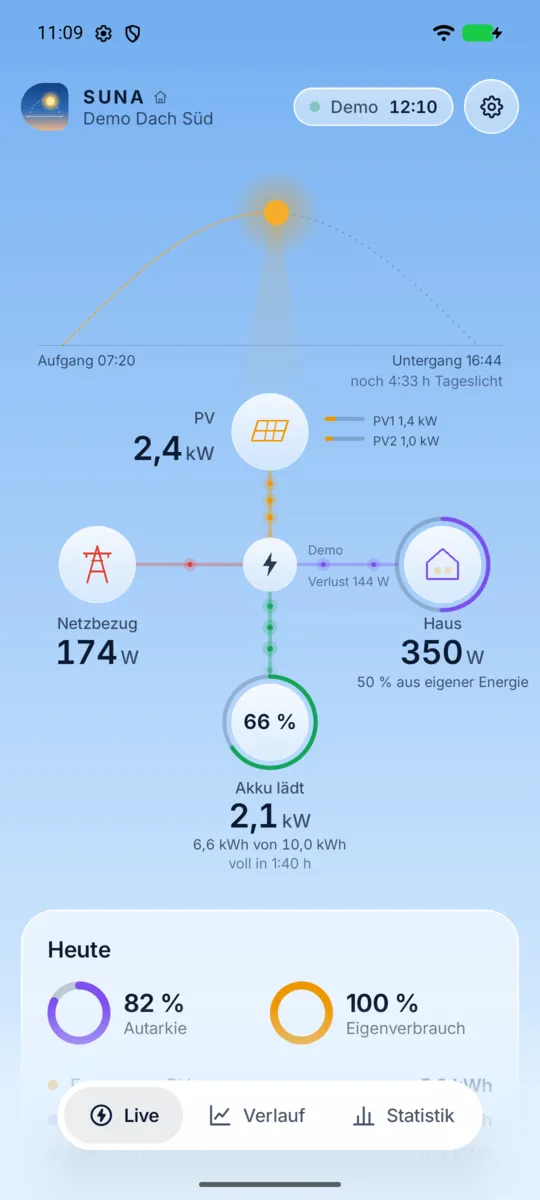
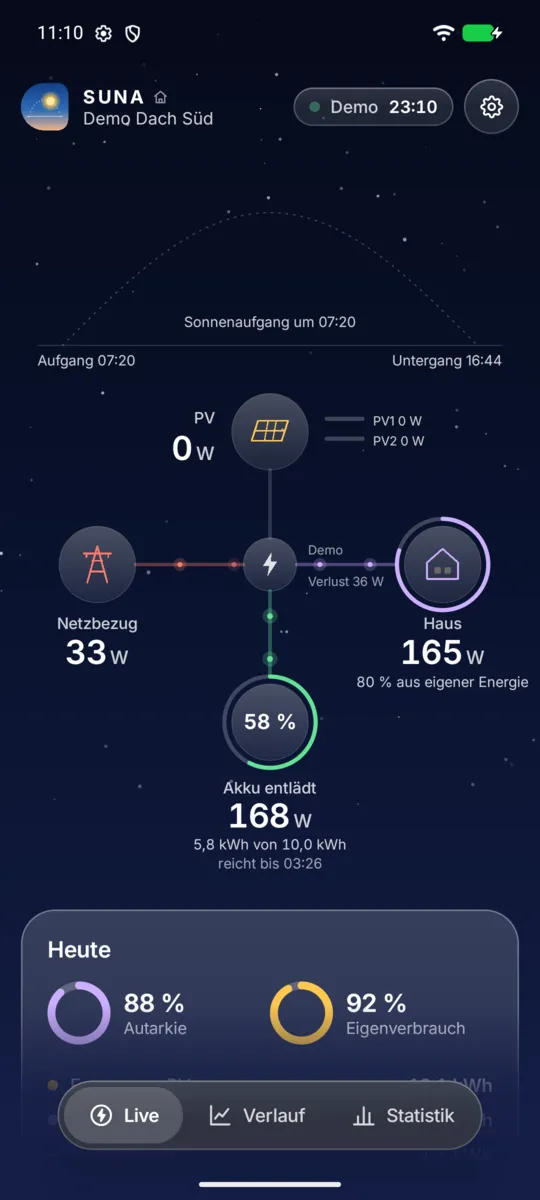
- Live energy flow Sun, grid, house and battery with glowing dots that follow the power.
- Home screen widget PV power and battery level at a glance, without opening the app.
- History and statistics Day, month and year with self-sufficiency and savings, swipe and tap for details.
- Home and online in one app Online systems from your account everywhere, your SUNA Home on your Wi-Fi, both side by side.
- Sky following the sun Bright by day, dark at night, matching the location of your system.
Try the SUNA app before everyone else
The SUNA app is coming to the Google Play Store. Before that there is a test, and I am still looking for testers. You see your PV system on your phone, with widgets for the home screen and several designs. You do not need your own PV system, the app has a demo to try out.
- Send me an email with the address of your Google account, the one you use in the Play Store.
- I add you as a tester and let you know.
- Then tap “Become a tester” via the link and install the app. Please stay for 14 days, that is how long Google requires the test.
Email hallo@suna.solar Get it on Google Play
You need Android 8 or newer and a Google account, the test runs in Germany, Austria and Switzerland. If you already have the app from suna.solar, you do not need to uninstall it.
Two ways to your data
Locally on your home network or via your manufacturer’s cloud. Yours is missing? Write to us at hallo@suna.solar, new drivers are built on demand.
Local and live, without cloud
Directly at the inverter on your home network. New values every few seconds, your data never leaves the house.
- Deye hybrid, single- and three-phase: via Modbus, with an RS485 gateway
- Deye hybrid, single- and three-phase: via the Wi-Fi stick, no extra device
- Growatt SPH: via Modbus, with an RS485 gateway
- Growatt SPH: with a stick running OpenInverterGateway
- Huawei SUN2000: via the SDongle, no extra device
- Sungrow hybrid (SH): via WiNet-S or LAN, no extra device
Via your manufacturer’s cloud
No extra hardware. Enter the sign-in details of your manufacturer account, new values arrive about every 5 minutes. As SUNA Online even without any device of your own.
- Deye, all models: via Deye Cloud
- Deye, Sofar and others: via SOLARMAN Smart (Solarman Cloud)
- Growatt SPH and MIN: via Growatt Cloud, with an API token
- Huawei SUN2000: via FusionSolar, access from the installer
- Sungrow SH and SG: via iSolarCloud, with a developer app
Questions
Do I need internet?
Not for SUNA Home: it runs on your home network and reads the inverter directly. You only need internet for updates and the daily license check, and if it is gone for a few days, SUNA just keeps running. SUNA Online and the way via the manufacturer cloud do need internet.
What hardware do I need?
A small computer that is always on, for example a Raspberry Pi 4 or 5, a mini PC or a NAS with Docker. For the local way via Modbus also an RS485 gateway for around €30 to €40. With Deye, the local way also works via the Wi-Fi stick that is already plugged in, with Huawei via the SDongle, with Sungrow via the WiNet-S or the LAN port and with Hoymiles via an OpenDTU or AhoyDTU.
Does SUNA work with my inverter?
Currently with Deye and Growatt, each locally or via the manufacturer’s cloud. As a beta also Huawei SUN2000 and Sungrow (locally or via FusionSolar or iSolarCloud), Hoymiles micro inverters locally via an OpenDTU or AhoyDTU or via the Hoymiles app, Anker SOLIX balcony systems via the Anker app, EcoFlow PowerOcean via the EcoFlow Open API and devices with a Solarman stick via SOLARMAN Smart. You find all devices at a glance under Devices at the top. More manufacturers will follow. Tell us at hallo@suna.solar which device you have.
What happens after 30 days?
With a license SUNA simply keeps running. Without one the display locks after a one week grace period, but recording continues. Your data is kept in any case.
Is my data safe?
Your measurements stay on your device. For your account we store your e-mail address, name and a hash of your password, never the password itself. To protect against attacks we log requests to the website for 7 days. With a license, SUNA reports once a day the license, system name, driver and version, but no measurements.
Can I put a tablet on the wall?
Yes. Kiosk mode shows the time, energy flow and today’s figures in full screen and dims at night.
Local or cloud, which is better?
Locally you get values every second and your data never leaves the house. Depending on the device this needs a small gateway. Via the cloud no extra hardware is needed, but values only arrive about every 5 minutes and depend on the manufacturer.
I only get my data through the app of my manufacturer. Does that work?
Yes, with SUNA Online. Add the system in your customer account and enter the sign-in details of your manufacturer account. Our server fetches the values about every 5 minutes, you need no hardware of your own.
Can SUNA change anything on my system?
No. SUNA only reads measurements and cannot change any settings on your inverter, battery or other devices. For Modbus only read commands are built in, for manufacturer clouds only queries for the system list and measurements. SUNA rejects any other request before it is sent, and automated tests make sure it stays that way.
Can I see my values on the go?
With SUNA Online, yes, in the browser and in the app wherever you are. SUNA Home shows the values only on your home network, the measurements never leave the house. If you want both, also add the system online via your manufacturer cloud.
Ready to watch your sun?
Create an account, install SUNA, try everything for 30 days.